
AICKO MAIL is a free email client for Windows 10 and 11 that gathers all your accounts in a single unified inbox. It adds filters, blocks remote images and tracking, and can send messages at a time you choose.
It suits people who write to teachers, classmates, laboratories and clubs from several addresses, and who want to keep that flow readable instead of switching between websites. Moreover, the interface comes in French and English, in light and dark themes.
Get AICKO MAIL
At a glance
- Platform: Windows 10 and 11, through the Microsoft Store
- Price: free
- Accounts: IMAP, POP, SMTP, unified inbox
- Privacy: remote images blocked, tracker counter
- Sending: scheduled, with undo
- Interface: French or English, light or dark
Getting started in five steps
- Install AICKO MAIL on Windows 10 or 11, using the Microsoft Store.
- Add an account. The program detects the server settings of most providers automatically, and supports IMAP, POP and SMTP.
- Then repeat for your other addresses, or import accounts from Thunderbird or classic Outlook. You will retype the passwords.
- Next, read your messages in the unified inbox or open one account at a time.
- Write a message, add an attachment, and send it now or schedule it.
What the free email client offers
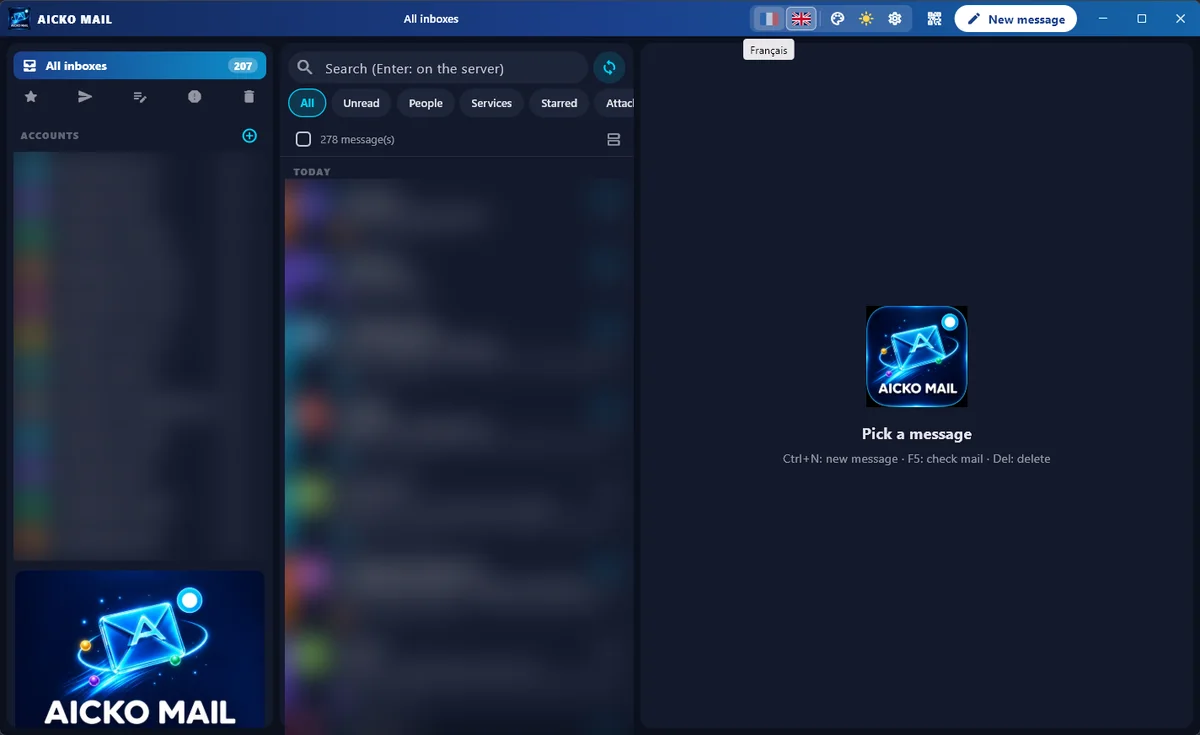
- Three columns: folders and accounts, the message list, and the reading pane.
- Unified views for all accounts, with filters for All, Unread, People, Services, Favourites and Attachments.
- Multiple selection with the keyboard or check boxes.
- Remote images blocked by default, with a counter of the trackers found in each message.
- A rich text editor, a switch to plain text, scheduled sending, an undo option after sending and a reminder if you forgot an attachment.
- A profile photo or logo and a signature for each account, and a short name and colour to tell accounts apart.
Privacy and security
The app stores passwords encrypted with Windows protection. Blocking remote images prevents a sender from learning when you open a message, and the tracker counter shows how often a sender tries it. Besides, a QR code lets you copy account settings between the computer and a phone, so you set things up once.
Each account keeps its own profile photo or logo, signature and colour, so that the message you send always looks as intended. Also, you can build the signature in the editor or paste it as HTML code with a preview. When you move from another mail program, the import reads the addresses and server settings, which spares you from typing them again.
Who it is for
Students often have a school address, a personal one and an address for a club or a project. Teachers, too, juggle several mailboxes. A unified inbox with filters saves time, and the People filter helps separate real conversations from automatic messages from services. The interface is available in French and English, in light and dark themes, with 8 colours.
Why it suits a science workflow
For example, science work generates many messages: data files sent by a lab partner, a supervisor’s comments on a draft, reminders about deadlines. Therefore, scheduled sending lets you write a message during an evening session and have it arrive at a sensible hour. The forgotten attachment alert is a small but real help when your message mentions an attached report.
Once you have organised your mail, take a look at our English homepage to organise your revision with the same care.
Tips
- Give each account its own colour and short name so you never reply from the wrong address.
- Use the Attachments filter to find a data file in seconds.
- Schedule messages to teachers for the morning rather than late at night.
Frequently asked questions
What is AICKO MAIL?
AICKO MAIL is a free email client for Windows 10 and 11. It brings several accounts into one unified inbox, adds filters, blocks remote images and tracking, and offers scheduled sending and an undo option after sending.
Which email accounts does AICKO MAIL support?
It supports IMAP, POP and SMTP accounts and detects the server settings of most providers automatically. You can also import account details from Thunderbird or classic Outlook, then retype each password.
Does AICKO MAIL protect me from email tracking?
The app blocks remote images by default, so a sender cannot use them to see that you opened a message. The program also shows a counter of the trackers detected in each message you read.
Can I schedule an email to send later?
Yes. You can schedule sending for a chosen date and time, and you have an undo option right after sending. A reminder also appears if your text mentions an attachment that you forgot to add.
